Cowork CUA + Orchestration Layer
Validated on Online Poker. Built for Queue-Based Work.
February 2026
Cowork is an AI productivity platform with a Computer Use Agent (CUA) that controls a desktop computer by looking at the screen and using the mouse and keyboard—the same way a human does. No APIs. No integrations. It reads pixels and clicks buttons. This document walks through a stress test of that system on online poker, explains how the orchestration layer works, and shows what it means for the kinds of jobs Go2’s workforce does every day.
Contents
1. The Poker Session: What Happened
2. Human vs. Autonomous: The Coaching Experiment
3. What It Looks Like (Screenshots)
4. The Interruption: Mid-Task Context Switch
5. A Note on Poker Bots (The Caveat)
6. Why Poker Is the Right Stress Test
7. What This Proves About Queue-Based Work
8. Why Screen Control: The Humanoid Robot Problem
10. How the System Works (Architecture)
11. Multi-Window Orchestration in Practice
12. The Task System: Self-Writing, Self-Correcting
13. Proactive Communication and Monitoring
16. What Works and What Doesn’t
17. Logging, Auditing, and the Full Session Log
1. The Poker Session: What Happened
|
Duration |
58 minutes |
|
Total iterations |
827 |
|
Avg cycle time |
3.3 seconds |
|
Hands dealt |
~85 |
|
Buy-in |
$40 (2 x $20) |
|
Final stack |
$588.10 |
|
Net profit |
+$548.10 (+1,370% ROI) |
|
Spotter checks |
228 (zero interventions) |
|
Supervisor calls |
0 |
|
CUA model |
Gemini 2.5 (computer-use) |
|
Spotter model |
Lightweight local model |
|
Supervisor |
Claude Opus (primary) + DeepSeek R1 (local secondary) |
|
Total session cost |
~$0.48 |
|
Profit per dollar of compute |
$1,142 |
The CUA sat down at a 6-max No-Limit Hold’em table on ACR Poker with a $40 bankroll. It played 827 iterations over 58 minutes, completely autonomously—zero human intervention from start to finish. It read HUD stats on opponents (VPIP, PFR, aggression factor, continuation bet percentage), calculated pot odds to decimal precision, sized bets relative to the pot, used hotkeys for speed, and correctly identified when to fold, when to value bet, and when to trap.
It folded 65% of hands. It won 16 of 24 pots played after its first rebuy. It ended the session at $588.10—a net profit of $548.10 on a $40 investment in under an hour.
The total AI compute cost for the entire session was approximately 48 cents.
One notable detail: when the ACR lobby popup unexpectedly covered the table mid-session, the CUA lost about 30 seconds before recovering. That’s a real failure—in production, the spotter would need to detect and dismiss non-task windows faster. But the system recovered on its own. No human needed to close the popup or restart anything.
2. Human vs. Autonomous: The Coaching Experiment
The showcase session above was fully autonomous. But earlier in testing, the system was run with human coaching—a human operator watching the session and occasionally overriding the CUA’s decisions. Clicking call when it planned to fold. Clicking raise when it planned to check. Making “instinct” plays based on how the table felt.
The results were unambiguous: human intervention made the system worse.
In the first coached session, the CUA was up $17 playing its own strategy. The human operator overrode several decisions—calling hands the CUA wanted to fold, raising in spots where the CUA calculated negative expected value. The result: the system lost the entire $20 buy-in. The human’s interventions didn’t just fail to help—they cost the system $37 ($17 in unrealized gains + $20 in actual losses).
In the fully autonomous showcase session that followed, with zero human intervention, the CUA turned $40 into $588.10.
|
Autonomous performance |
+$548.10 (+1,370% ROI) |
|
Human-coached performance |
Negative ROI (lost $20 buy-in from +$17 position) |
|
Cost of human intervention |
-$37 in first session alone |
|
Conclusion |
System performs significantly better without human override |
This is counterintuitive and worth sitting with. The AI agent, running on a mid-tier vision model reading pixels off a screen, made better poker decisions than a human watching the same game. Not because the AI is smarter in some abstract sense, but because it’s disciplined. It doesn’t tilt. It doesn’t chase losses. It doesn’t override its own calculated expected value because a hand “feels” right. It folds 2♣2♠ from early position every single time, at iteration 1 and at iteration 650, with the same dispassion.
For a finance audience, the parallel should be obvious. Consistency is the edge. The system’s advantage isn’t that it’s brilliant—it’s that it doesn’t deviate from its strategy. In queue-based work, this translates directly: the same quality of output at hour 23 as at hour 1.
3. What It Looks Like
Below is the actual screen during play. Left side: the ACR poker table with HUD overlays showing stats on each opponent. Right side: the CUA’s real-time decision log. At the bottom of the right panel, the task switcher is visible—this is where you change what the CUA is working on.
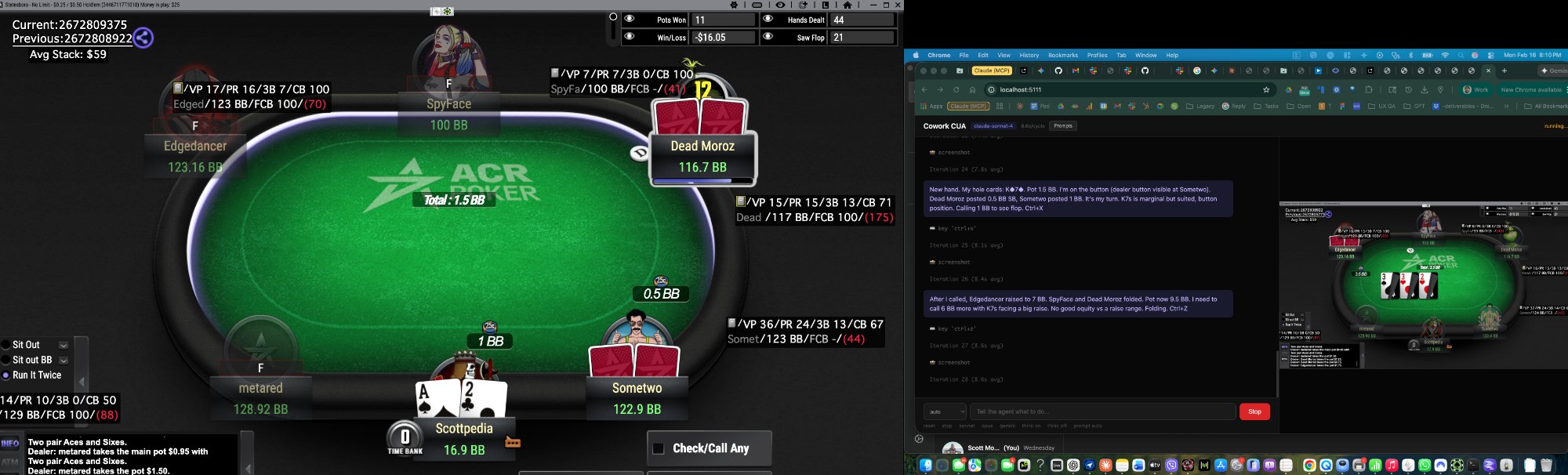
The CUA is thinking out loud on the right. It reads its hole cards (K♦7♠), checks position, looks at pot odds, reads the HUD overlay to assess whether the opponent is loose or tight, and decides whether to play or fold. Each cycle is 3–5 seconds. It reasons through each hand fresh—no memorized strategy, just visual information and calculation.
The HUD stats on the left aren’t fed through an API. The CUA reads them off the screen. It sees “VP19 PR17 AG2.8 CB72%” on an opponent and interprets that as a tight-aggressive player with a high continuation bet rate—which changes how it plays against them. It uses the mouse to scroll the bet slider when sizing raises and clicks on HUD boxes to pull up extended stats.
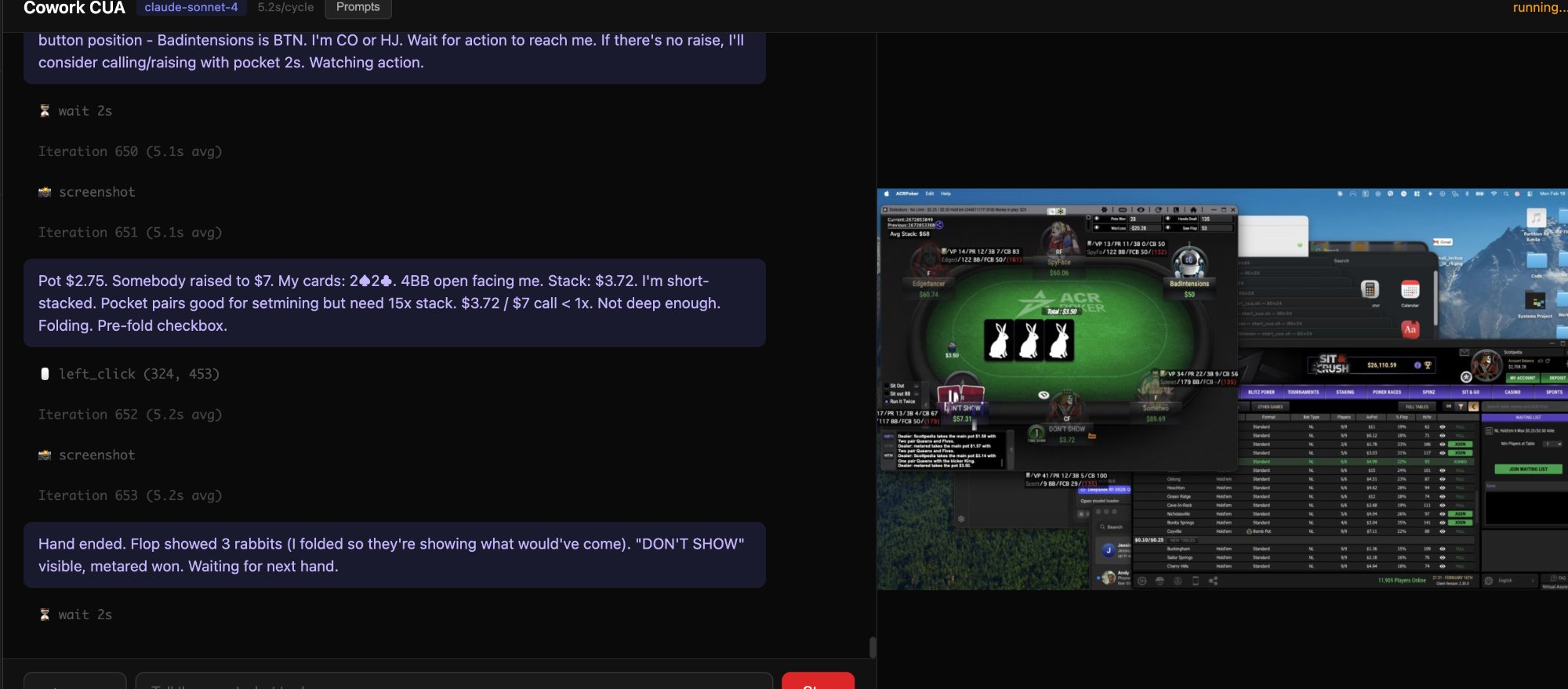
Iteration 650. Forty minutes in. Still folding trash, still reading the board, still managing the time bank. No drift, no degradation, no confusion about game state. The spotter confirmed activity on every single 2-second check. The self-healing loop designed to catch failures had nothing to catch.
4. The Interruption: Mid-Task Context Switch
During the session, the CUA detected an incoming iMessage notification and—without being told to—paused the poker task, opened Messages, read through a personal conversation, assessed the emotional context, and began drafting a response.
This was technically a bug—the CUA was supposed to stay on the poker task. But it’s also arguably a feature. The system detected something it judged as needing attention, switched context, gathered information by scrolling through the conversation to understand the full thread, and started composing a response that matched the emotional tone of the exchange.
For the stress test, this is a failure mode—it left the table unattended. In production, task prioritization rules prevent this unless explicitly configured. But the capability it demonstrates matters: the CUA isn’t a script. It can read, interpret, and respond to unstructured information across different applications. It scrolled back through a conversation to gather full context before attempting a reply. That’s the difference between a macro and an agent.
This also demonstrates the kind of application switching that matters in real work—the due diligence analyst hopping between six tools, the support worker popping from Zendesk to Shopify to the shipping dashboard. The CUA handles context switches between applications natively because it’s navigating the screen the way a person would, not following a hard-coded workflow.
5. A Note on Poker Bots
Before anything else: if one were to build a poker bot, you wouldn’t do it this way.
The right way to build a purpose-built poker bot is to pipe hand histories into a SQL database using PokerTracker 4, then have the AI read structured data in real-time. You’d only use screen control for clicking buttons. Card recognition, pot odds, opponent stats—all from the database, not pixels.
This is not that. This is a general-purpose computer-use agent that reads the screen the way a human does. No database feed. No API. It takes a screenshot, figures out what’s happening, makes a decision, and clicks. Every few seconds. For hours.
That’s exactly what makes it a great stress test. A specialized database approach would be better for poker specifically. That’s the point. This system isn’t specialized. It’s general-purpose. And it still works.
6. Why Poker Is the Right Stress Test
Online poker is a terrible environment for a vision-based agent. The UI is janky. Buttons move. Popups appear. The time bank ticks down. Opponents act at unpredictable intervals. The table state changes every few seconds. Animations overlay the action zone. Multiple information sources compete for visual attention simultaneously.
That’s exactly why it’s useful. Can the CUA orchestration layer handle sustained, iterative decision-making in a chaotic UI with real consequences for mistakes?
Think about what a back-office support worker does. They sit in front of a screen. They process items from a queue—tickets, claims, orders, forms. Each item requires reading the screen, understanding the state, making a decision, clicking buttons, and moving to the next one. Hundreds of times per shift. The UI is usually bad. Things go wrong. They adapt.
Poker is the same loop at a higher clock speed. 827 iterations over 58 minutes with zero crashes, zero stuck loops, and zero supervisor interventions. 90% of human poker players lose money. This system operates in the top 10%.
7. What This Proves About Queue-Based Work
The people we’re building this for aren’t poker players. They’re support workers in the Philippines, India, and Latin America who sit in front of a screen and process queues all day. Insurance claims. Customer service tickets. Data entry forms. Order processing. Compliance checks. Due diligence reviews. Shipping logistics. Account reconciliation.
Every one of those tasks follows the same pattern the CUA demonstrated: read the screen, understand the state, make a decision, execute an action, move to the next item. Repeat.
But most of those tasks involve multiple tools. It’s not one screen—it’s seven or eight screens, and the worker’s job is to be the human integration layer between all of them. Go2 has been tracking this across 51 countries for eight years. The average complex support task involves 8–12 distinct tool interactions. Some workflows require 16 separate motions to reach a single outcome.
If the CUA can handle 827 iterations of high-speed, high-stakes, visually complex poker with zero failures—and outperform a human coach in the process—it can process a ticket queue.
8. Why Screen Control: The Humanoid Robot Problem
Why are companies like Tesla, Figure, and Boston Dynamics building humanoid robots in the shape of humans? Not because the human form is ideal—it isn’t. It’s because the physical world was built for human bodies. Warehouses, factories, offices—every door, shelf, and tool was designed for a person. Redesigning every workspace for a purpose-built form factor is decades and trillions away. So you build the robot to fit the world that already exists.
The same logic applies to software.
The ideal way to automate a workflow is with structured APIs and direct system integrations. Clean, fast, reliable. Cowork uses those when available—it has 50+ MCP integrations for exactly this. But most companies, especially SMBs and especially in emerging markets, run on a patchwork of legacy tools, browser-based apps, and multi-step processes across platforms that were never designed to talk to each other. They don’t have the budget, engineering talent, or organizational will to rebuild. And even at well-resourced companies, the engineering time to build proper integrations often exceeds the cost of just hiring another person to click through the screens.
That does not mean you start with CUA. In production, the progression is the opposite. First use MCP and direct integrations wherever they exist. Then use any structured browser or system automation you can get away with. Then peel off telemetry, scraped state, or other machine-readable signals so the system is not reasoning from pixels alone. Only after that do you hand the dirty remainder to computer use.
That middle bucket matters. A lot of real workflows are not fully MCP-accessible, but they are not truly raw-screen problems either. You can often scrape part of the page, capture telemetry, or lock onto a narrow, repeatable button structure. That is a much better setup than asking a general vision model to rediscover the whole interface every cycle.
For the browser layer, see Playwright’s locator guide for working with page elements.
So instead of waiting for the world to be rebuilt, you build an AI that works within it—screen, mouse, keyboard.
Think of Waymo or Tesla. A self-driving car doesn’t redesign the road. It accesses a steering wheel, pedals, and turn signals—the same controls a human uses. Not the optimal long-term design. But it works right now because it uses the human interface layer already in place. The CUA is the same idea applied to a desktop.
9. The Multi-Tool Reality
Go2 has been tracking how remote workers actually work for eight years. One thing we measure is tool switching—how many distinct applications a worker touches to complete a single task. Some workflows require 16 different motions across 7–8 tools.
Concrete example: an enhanced due diligence analyst at a payroll company. Reviews flagged accounts. Opens the customer record in an internal CRM. Pulls up a government registry in a browser tab. Cross-references against a third-party verification tool. Checks transaction history in a banking dashboard. Looks up correspondence in email. Reviews notes in a shared document. Fills out a determination form in yet another system. Each tool has a different UI. None talk to each other. The analyst’s job is to be the human integration layer—copying, pasting, comparing, clicking through forms.
Could you build proper integrations? In theory. In practice, the engineering cost to pipe data between six proprietary systems—some of which don’t even have APIs—exceeds the cost of hiring a person to do the clicking. That’s also why these roles have been slow to be replaced by AI: the integration engineering is more expensive than the labor savings.
Or a small e-commerce operation: Shopify, a shipping partner, inventory management, a knowledge base, Zendesk, Stripe, QuickBooks. Seven tools, no unified interface. Someone has to pop between all of them holding task state in their head.
This is what the CUA was built for. Not replacing clean API pipelines—those are handled by MCP. The CUA exists for the messy, fragmented, multi-tool workflows where the only integration layer available is a pair of eyes and a mouse.
And even there, the strongest version is usually not “pure CUA.” It is CUA as the last-mile layer after the system has already stripped out whatever can be made structured. If you can hand the agent telemetry, extracted state, or a stable visual pattern to lock onto, success rates go up fast. The worst version is blind CUA as the first solution. The best version is focused CUA sitting on top of everything cleaner you could peel away first.
10. How the System Works
Three layers. Each does one job. Above all three sits the broader Cowork orchestration system with full MCP access.
Operationally, the system thinks in a ladder: MCP first, structured automation second, telemetry and scraping wherever possible, and CUA last. The reason is simple: every step up that ladder is faster, cheaper, and more reliable than asking a vision model to infer the whole state of the world from screenshots.
Layer 1: The CUA (the worker)
Mid-tier AI vision model (Gemini 2.5 in this test). Takes a screenshot, reasons about it, executes an action—click, scroll, type, wait—then takes another screenshot. Each cycle: 3–5 seconds. Uses the mouse and pointer like a human. Picks up hotkeys over time for speed. Can use Spotlight (Mac) or Start menu (Windows) to find and open applications, navigate Finder, drag files, switch windows. Anything a person at the desk could do.
On its own, raw CUA is the least reliable layer in the stack. It gets dramatically better when it is constrained to a narrow task with stable button patterns, or when it is grounded by telemetry and extracted state from the surrounding system. That is the real production pattern: let structured signals do as much of the understanding as possible, then use CUA for the messy clicks that are left.
Layer 2: The Spotter (the watchdog)
Separate, lightweight model on a 2-second interval. Independent from the CUA. Is the CUA alive? Is the screen changing? If stuck: nudge. If nudge fails: escalate. In the poker session, 228 checks, zero interventions.
Layer 3: The Supervisor (the manager)
Claude Opus. Only called when the spotter flags a problem. Can look at the screen, diagnose issues, issue corrective commands: continue, nudge, revert, restart, or stop and alert the human. DeepSeek R1 runs locally as a secondary reasoning engine.
Critically, the supervisor has full MCP access. It can open and arrange windows, browse the web, read and write files, interact with the terminal, and coordinate with the CUA across the entire OS. In multi-tool workflows, the supervisor sets the stage—opens browser tabs and desktop apps, arranges windows—then hands off visual work to the CUA. The supervisor plans; the CUA executes.
In the poker session: zero supervisor calls. The expensive model sat idle the entire time.
Three Models, 48 Cents
CUA (Gemini) at ~$0.003/screenshot. Spotter on a cheap local model. Supervisor (Opus) on standby. Total session cost: $0.48. Extrapolated to 24-hour sustained operation: ~$7/day.
11. Multi-Window Orchestration in Practice
Back to the due diligence analyst. The supervisor receives: “Review flagged account #4472.” It knows from the task knowledge base this requires CRM, government registry, verification tool, transaction dashboard, email, and determination form. It opens all of them—MCP for browser-based tools, CUA using Spotlight for desktop apps. Arranges windows: browsers tiled on one side, desktop tools on the other.
Then the CUA works across all of them. Reads the customer record. Cross-references the registry. Pulls transaction history. Reads the email thread. Fills the determination form field by field, correlating data across every open window. The supervisor monitors, ready to step in if a window closes or a tool requires re-authentication.
Faster than a human—not because the CUA clicks faster (it’s slower for any individual action), but because it doesn’t lose context. It doesn’t forget what it saw on the previous screen. It doesn’t re-read the customer name when switching tabs. It correlates information across all windows simultaneously. Over a shift, that consistency compounds.
12. The Task System: Self-Writing, Self-Correcting
Every task is backed by a knowledge base—markdown files loaded into the system prompt. Instructions on what to look for, how to navigate the UI, what decisions to make, how to recover from errors.
The CUA writes and updates these files itself. New situations get documented. Mistakes get corrected. The knowledge base improves every session. It’s a living document maintained autonomously.
Creating a new task takes under 30 seconds. Describe what you want: “check my email,” “process Zendesk tickets,” “play poker.” The system auto-generates a task profile, selects the right model, applies configuration, and starts. If it encounters something new, it builds a profile on the fly.
Over time, the knowledge base learns the user’s whole environment—which apps live where, how UIs are laid out, the user’s preferences. Knowledge correlates across tasks: something learned in Zendesk informs how it handles similar UIs elsewhere. The system gets faster and more accurate the longer it runs.
The system can also gradually tie into underlying databases and APIs, shifting work from visual processing to structured data calls. Vision is the starting point, not the end state—but it’s the starting point that works today without any engineering effort.
[Screenshot placeholder: task selection interface showing available tasks and the task switcher]
13. Proactive Communication and Monitoring
When a task starts, the system generates a secure link—Cloudflare tunnel with embedded API key. Open it on your phone and watch the CUA work live: screen, decision log, spotter status.
The system proactively reaches out via the messaging apps on the computer—iMessage, Slack, WhatsApp, email—by opening the app and typing, not through an API. Stuck on something? It messages you. Finished? It reports. Has a question? It asks.
And it never stops. The spotter catches freezes. The supervisor catches confusion. If the CUA session crashes, the auto-restart relay spins up a new one and resumes. Unattended overnight operation is the design target, not an edge case.
14. Privacy and Data Locality
A natural concern with a system that reads screens and processes customer data: where does that data go?
The answer: nowhere. It stays on the machine.
The CUA runs entirely locally. Screenshots are taken locally, processed locally, and discarded after each iteration. The knowledge base is stored as local files. Customer data—names, account numbers, transaction histories, whatever appears on screen—never leaves the laptop. It’s not uploaded to a cloud service. It’s not stored in a remote database. It’s not transmitted anywhere.
The minimum hardware requirement is modest: the equivalent of an M1 MacBook with 16GB of RAM. Most modern PCs can run it. For older or slower machines, virtual computing resources can supplement local processing—but even then, the customer data stays local.
For company-owned machines—which is the standard deployment model—the privacy story is clean. The CUA operates within the same security perimeter as the human worker it replaces. It sees what they would see. It accesses what they would access. And just like a human worker, the data it processes doesn’t leave the workstation.
When the system does need to communicate externally—sending a status notification to the user’s phone, for example—it uses encrypted handoff tokens for the notification itself, not the underlying customer data. The notification says “task complete” or “need input on account #4472.” It doesn’t transmit the account data.
There is a broader orchestration layer for agent-to-agent communication and more complex workflows that involve external systems, but that’s not what this document covers. For the core CUA workload—the screen reading, the decision-making, the clicking—everything is local. From a compliance standpoint, this sidesteps most data residency and data processing concerns, because the data never moves.
15. Economics
|
|
CUA Agent |
Human Worker |
|
Cost per day (24hr) |
~$7 |
~$60 (Philippines/LatAm, 8hr shift) |
|
Hours available |
24 |
8 |
|
Effective cost per hour |
~$0.29 |
~$7.50 |
|
Cost ratio |
~25x cheaper per hour |
Baseline |
|
Consistency |
Same at hour 23 as hour 1 |
Fatigue, distraction, breaks |
|
Speed per action |
3–5 sec/cycle |
Faster per click, slower over shift |
|
Context retention |
Perfect across 800+ iterations |
Degrades over shift |
|
Error recovery |
Automatic (spotter + supervisor) |
Manual escalation |
|
Multi-tool memory |
Correlates across all open windows |
Forgets between tab switches |
|
Scaling |
Spin up another instance |
Recruit, train, onboard |
|
Onboarding |
Under 30 seconds |
Days to weeks |
|
Knowledge retention |
Permanent, improves every session |
Leaves when the person leaves |
|
Benefits & overhead |
None |
Required |
At $7/day for 24 hours versus $60/day for 8 hours, the CUA is ~25x cheaper per hour of productive work. No benefits, no management, no onboarding. Doesn’t call in sick. Doesn’t quit.
The CUA is slower per individual action. But it doesn’t take breaks, doesn’t lose focus at hour 6, doesn’t forget what it saw three tabs ago, and runs through the night. Over 24 hours, throughput advantage is significant.
There’s a compounding effect. The 50th time it processes a Zendesk queue, it’s meaningfully faster and more accurate than the first, because it has 49 sessions of accumulated knowledge. A human builds this expertise too, but it’s locked in their head and leaves when they do. The CUA’s knowledge is permanent, transferable, and improves every session.
16. What Works and What Doesn’t
Works well: Queue-based tasks with clear success criteria. Multi-tool workflows where the job is being the integration layer between systems. Reading screens, clicking, correlating information across applications. Tasks where 3–5 second cycle time is acceptable—most back-office work.
Needs improvement: Highly dynamic UIs. Sub-second response requirements. Complex multi-step workflows with fragile state management. The lobby popup incident (30 seconds lost) is a real failure mode. Multi-window orchestration works but isn’t bulletproof.
Not the right tool: Anything with an MCP integration or clean API—those are always preferred. And even before CUA, there is usually a middle layer worth exploiting: scriptable browser actions, scraping, telemetry, or stable UI structures that can be made semi-structured. The CUA is for the long tail after that cleanup work is done: legacy systems, proprietary software, no-API browser tools, and the multi-tool workflows where building deeper integrations costs more than the labor.
Honest framing: It can attempt any screen-based task. Reliability depends on complexity, UI stability, and accumulated knowledge. The orchestration layer handles failures. Not a perfect worker—a self-healing one that runs 24/7 for a fraction of the cost and improves every session.
17. Logging, Auditing, and the Full Session Log
Every task produces sorted, structured logs. Every iteration, screenshot event, action, spotter check, and supervisor call gets timestamped. The poker session produced a 2,660-line log with a full post-session review including strengths, weaknesses, and improvement recommendations.
The complete session log is available as a separate file (cowork-cua-session-log.txt). The JSON format log will be linked separately.
The log is the real documentation. This walkthrough is the summary.